Categories more
- Adventures (62)
- Arts / Collectables (14)
- Automotive (77)
- Aviation (65)
- Bath, Body, & Health (123)
- Children (6)
- Cigars / Spirits (71)
- Cuisine (66)
- Design/Architecture (22)
- Electronics (63)
- Entertainment (36)
- Event Planning (115)
- Fashion (45)
- Finance (10)
- Gifts / Misc (6)
- Home Decor (118)
- Jewelry (41)
- Pets (3)
- Philanthropy (1)
- Real Estate (16)
- Services (44)
- Sports / Golf (14)
- Vacation / Travel (85)
- Watches / Pens (33)
- Wines / Vines (34)
- Yachting / Boating (67)



Best 3D Printer for Kids in 2026: Safe, Easy & Fun Models for Young Makers

Published
08/24/20263D printing gives children a hands-on way to explore STEM, design, and creativity. A digital model can become a toy, classroom project, name tag, or useful object, helping young makers connect design with a physical result. For parents choosing a 3D Printer for Kids, safety, ease of use, reliable printing, and simple software matter more than advanced specifications. Adult supervision is still essential because printers contain hot components and moving parts.
What Should Parents Look for in a 3D Printer for Kids?
A child-friendly setup should remove unnecessary complexity without limiting opportunities to learn. The following factors have the biggest effect on use.
Easy-to-Use Controls
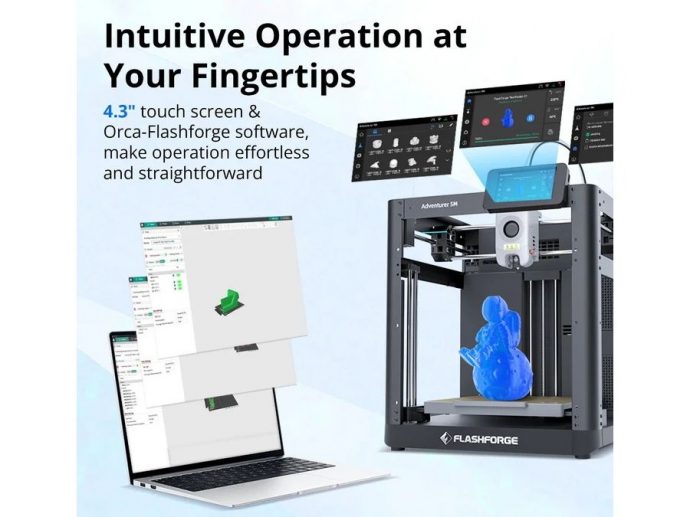
Clear menus, simple setup, and automated calibration make the first printing experience less intimidating. A beginner-friendly workflow lets children spend more time designing or choosing models instead of troubleshooting basic machine settings.
Safety and Enclosed Design
For families comparing a 3D Printer for Kids, an enclosed machine can reduce direct access to the moving print area and hot nozzle. The Adventurer 5M Pro, for example, combines a fully enclosed structure with air filtration for home and education environments. Children should still print with adult guidance and avoid touching the nozzle, build plate, or moving parts during operation.
Reliable Printing
Repeated failures can quickly reduce a child's interest. Automatic leveling, stable motion, filament monitoring, and dependable slicer profiles can make results more repeatable. For most families, a printer that works consistently is more useful than one filled with advanced settings a beginner may rarely use.
Software Matters Too
The slicer turns a digital model into a printable file. An intuitive interface should make importing a model, choosing basic settings, preparing supports, and sending a print job easy to follow. Flash Studio Desktop uses a simplified interface while still offering advanced controls for users who want to learn more.
Why a Multi Color 3D Printer Is More Appealing to Young Makers
Color can make a project feel more personal. A Multi Color 3D Printer gives children more freedom to create colorful animals, toys, keychains, mini figures, and school models without relying on post-print painting.
With a Multi Color 3D Printer, young makers can experiment with contrasting colors, labels, patterns, and character details. This adds another layer of visual thinking and personalization, which can make DIY projects more engaging.
Flashforge 3D Printers for Different Creative Needs
Different skill levels call for different workflows. A first printer should keep setup manageable, while a more advanced model can support more demanding projects as skills grow.
Flashforge Adventurer 5M Pro
The Adventurer 5M Pro is a practical example for families, classrooms, and beginner makers. Its enclosed CoreXY design, automatic leveling, quick-swap nozzle system, built-in camera, and filtration system reduce common setup and monitoring tasks. For parents considering a 3D Printer for Kids, that means more attention can stay on modeling, creativity, and learning rather than routine machine adjustment.
Flashforge Creator 5 Pro
Creator 5 Pro is better suited to experienced users, older students, design labs, or family makers who have moved beyond simple projects. Its four independent toolheads support multi-color and multi-material printing, while the enclosed frame and active chamber heating suit more advanced workflows. It makes more sense as a next-step machine for complex models, prototypes, and advanced school projects.
If you're comparing options for a family or school setup, exploring Flashforge's printer lineup can help match the machine to the child's experience level and creative goals.
How 3D Printing Software Makes Multi-Color Printing Easier
Software connects the model to the finished print. A typical workflow moves from model import to slicing, color assignment, settings review, and print management. With a Multi Color 3D Printer, clear software can simplify color planning and reduce manual preparation.
Flashforge's software ecosystem supports both simple controls and more detailed settings, allowing beginners to start with simpler profiles while experienced users adjust parameters as projects become more ambitious.
Final Takeaway: Choose a Printer That Grows With the Child
The best 3D Printer for Kids should balance safety, ease of use, reliability, software experience, and creative potential. Beginners benefit from fewer manual setup steps, while more experienced young makers may eventually want a Multi Color 3D Printer for richer designs and more complex projects.
The best choice is not necessarily the printer with the most features. It is one that fits the child's current abilities, works well with adult supervision, and offers room to grow. Flashforge provides options for beginner-friendly family printing and more advanced creative workflows, making it easier to choose a model for the next stage of a young maker's journey.
Comments
