Categories more
- Adventures (77)
- Arts / Collectables (24)
- Automotive (82)
- Aviation (77)
- Bath, Body, & Health (148)
- Children (54)
- Cigars / Spirits (91)
- Cuisine (99)
- Design/Architecture (39)
- Electronics (72)
- Entertainment (49)
- Event Planning (122)
- Fashion (88)
- Finance (18)
- Gifts / Misc (14)
- Home Decor (135)
- Jewelry (74)
- Pets (12)
- Philanthropy (5)
- Real Estate (48)
- Services (62)
- Sports / Golf (44)
- Vacation / Travel (173)
- Watches / Pens (84)
- Wines / Vines (52)
- Yachting / Boating (89)



Desky vs UpDown Desk - Desky #1 Choice for Tall Australians (2026)

Published
03/30/2026We compared two of Australia’s most popular height-adjustable sit-stand desks to find the best option for tall users, and the Desky Dual Melamine Sit Stand Desk came out clearly on top for anyone standing 185cm or taller.
This Desky vs UpDown desk tall showdown covers maximum height range, motor stability under load, smart desk technology, and cable management, so you can make a confident call before spending over a thousand dollars.
Tall users carry specific requirements that not every sit-stand desk can actually meet. Maximum height clearance, dual-motor stability at full extension, and enough power management for a multi-monitor rig all matter considerably more when you need the desk to perform consistently at the very top of its range.
Desky edges out UpDown on smart technology, integrated cable and power management, and independent certification credentials. The UpDown KLIK holds a 2cm height advantage on paper, but real-world performance at maximum standing height tells the full story for tall Australians.
At a Glance: Desky vs UpDown Desk Comparison
|
Feature |
Desky Dual Melamine |
UpDown KLIK Melamine |
|
Height Range |
60-125cm |
62-127cm |
|
Motor Type |
Dual Motor |
LINAK Motor |
|
Load Capacity |
140kg |
~150kg |
|
Cable Management |
Built-in channels + power boards (up to 8 outlets) |
Not included |
|
App Control |
Yes (iOS and Android) |
No |
|
Voice Control |
Siri and Google Assistant |
No |
|
Certifications |
TUV Rheinland, AFRDI Blue Tick |
Red Dot Award (controller) |
|
Frame Warranty |
10 years |
10 years |
|
Desktop Warranty |
Confirm with Desky |
5 years |
|
Assembly |
Standard tool assembly |
Tool-free, approx. 5 mins |
|
Best For |
Tall professionals, heavy setups, smart ergonomics |
Quick setup, max height priority |
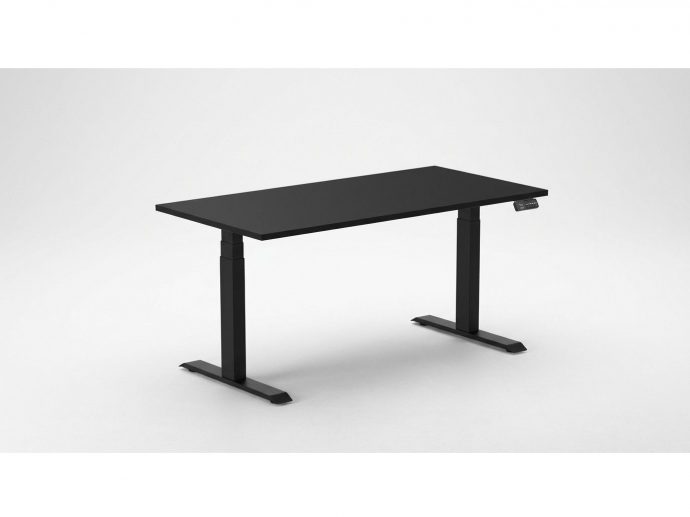
Desky Dual Melamine Sit Stand Desk - Best Standing Desk for Tall Australians
How High Does It Go: Height Range for Tall Users
The Desky Dual Melamine Sit Stand Desk adjusts from 60cm to 125cm, covering the full ergonomic range for users from 155cm through to around 205cm. Tall Australians, particularly those over 185cm, spend most of their working hours in the 115-125cm standing zone, where motor quality and frame rigidity become the deciding factors.
Independent Australian reviewers at ShedBlog named the Desky Dual the best ergonomic standing desk for tall people in Australia [7], with the Dual’s engineering specifically built around how the frame behaves at maximum extension. That recognition carries real weight for any user who needs consistent, wobble-free performance at the top end of the range rather than just impressive numbers on a spec sheet.
Stability Where It Counts: Dual Motors at Maximum Height
The Desky Dual runs two motors simultaneously, delivering smooth and fast height transitions at 36mm per second with 40dB of operating noise. For tall users who position the desk near or at its upper limit during standing sessions, that dual-motor setup provides the frame rigidity that single-motor competitors consistently struggle to match under real load.
The heavy-duty steel frame handles up to 140kg, supporting a dual-monitor rig, desktop PC, laptop, and a full peripheral set without flex or movement at height. Frame stability at maximum standing height is a weak point of many cheaper or single-motor desks, and the Desky Dual’s engineering directly addresses this need for multi-monitor setups and professional gear.
Smart Desk Technology: App Control and Siri Voice Commands
The Desky Dual connects to a dedicated mobile app and responds to Siri voice commands, making it one of the very few genuinely smart standing desks on the Australian market. Tall users can save 4 height presets through the app, locking in their exact sitting and standing positions without re-adjusting each session manually.
The app tracks desk usage habits and sends sit-stand reminders, giving users a clear picture of their daily movement patterns. For someone working long hours at a home office or professional station, those built-in reminders function as a real ergonomic tool rather than a marketing feature.
Siri delivers hands-free desk adjustment mid-call or mid-task, removing the need to reach for the controller at inconvenient moments. This positions the Desky Dual as a genuinely smart standing desk, not just an electric one.
Cable and Power Management Built for Complex Setups
The Desky Dual features purpose-designed under-desk cable channels that neatly route all cables as the desk moves, eliminating the dangling-cable problem that affects most competitors. For a tall user running dual monitors, a desktop PC, external drives, and charging peripherals simultaneously, that clean routing makes a genuine daily difference.
Optional integrated power boards with up to 8 outlets sit neatly under the desk surface, meaning the entire workstation powers from a single point without extension cords trailing to the wall. That system is engineered into the desk rather than bolted on as an afterthought, resulting in a cleaner design and better compatibility with professional and content-creation environments.
Pros:
- Named Australia’s best ergonomic standing desk for tall people by independent reviewers at ShedBlog [7]
- Dual-motor system delivers stability and rigidity at maximum standing height
- Siri voice control and a dedicated mobile app with 4 saved preset positions plus sit-stand reminders
- Purpose-built under-desk cable channels and optional integrated power boards (up to 8 outlets)
- 140kg load capacity suits heavy multi-monitor and professional gear setups without compromise
- TUV Rheinland and AFRDI Blue Tick certified, independently verified for load capacity and structural quality
- 10-year frame warranty for long-term ownership confidence
Cons:
- Maximum height of 125cm is 2cm below the UpDown KLIK’s 127cm at full extension
- Cable management accessories are optional add-ons, not included as standard in the base price
Best For: Tall home office workers, content creators, multi-monitor professionals, and anyone who wants smart ergonomic desk control built in rather than added on.
Ready to upgrade to Australia’s top-rated sit-stand desk for tall users? Visit desky.com.au to configure your Desky Dual Melamine Sit Stand Desk and choose from multiple sizes, frame colours, and desktop materials.
Contact Details:
- Website: desky.com.au
- Product: Desky Dual Melamine Sit Stand Desk
- Phone: (07) 3088 9131
- Email: help@desky.com.au
- Instagram: @deskyaus
- Facebook: www.facebook.com/deskyaus
Desky Australia address: 2620 Ipswich Rd, Darra, QLD 4076, Australia
If the CMS supports embedding, use the Google Maps iframe embed for best results.
UpDown KLIK Melamine Standing Desk
Height Range and Tall-Person Compatibility
The UpDown KLIK Melamine extends from 62cm to 127cm, giving it a 2cm maximum height advantage over the Desky Dual at full extension. For a user standing around 195-200cm, that additional clearance can bring the desk to a slightly more comfortable standing elbow position, though the practical difference is narrow for most tall users in the 185-195cm range.
The KLIK’s height range suits most Australians comfortably, up to around 200cm in standing mode. Users in the 200-210cm range may find headroom tighter depending on their monitor height and seating configuration, and should compare both models carefully before committing.
LINAK Motors and Real-World Stability
The UpDown KLIK uses LINAK motors, a Danish manufacturer widely respected in the sit-stand desk industry for precision engineering and long-term reliability. The UpDown KLIK supports approximately 150kg of load capacity, covering most standard home office and professional configurations.
The UpDown KLIK loses rigidity at maximum height under heavy loads, where the single-motor system carries more lateral load on the frame than a dual-motor setup can.
Controller Design and Smart Features
The KLIK’s controller uses a tilt-up and tilt-down mechanism rather than traditional push buttons, a design that earned a Red Dot Design Award for intuitive simplicity [2]. It supports preset height positions via the controller interface and is easy to use from day one, with no additional configuration required.
The KLIK does not include a dedicated mobile app or Siri integration as standard, placing it behind the Desky Dual in terms of smart desk functionality. While the controller offers built-in visual sit-stand reminders, tall users who rely on smartphone usage tracking and voice-controlled adjustments to maintain healthy movement habits will find the KLIK more limited in this area.
Desktop Customisation Options
The UpDown KLIK Melamine comes in a wide range of desktop colours and length options from 105cm to 180cm. The melamine surface is practical, hard-wearing, and well-suited to home office and professional environments where durability and a clean finish are both priorities.
UpDown’s broader product range includes locally sourced Australian timber desktops, though these are only available on different KLIK configurations rather than the standard melamine model compared here. The melamine variant is a strong value choice for users who prioritise surface durability and simple maintenance over premium material aesthetics.
Independent reviewers noted that Desky's hardwood desktop options deliver higher material quality than UpDown's timber alternatives for buyers looking to upgrade beyond melamine [7].
Pros:
- 127cm maximum height, 2cm taller than the Desky Dual at full extension
- LINAK Danish motors, a respected industry standard for precision and long-term reliability
- Red Dot Award-winning tilt controller for intuitive height adjustment with no buttons
- Tool-free plug-and-play frame assembly completed in approximately five minutes
- 100-day return policy provides an extended trial window before committing
- 10-year frame warranty for long-term ownership confidence
Cons:
- No dedicated mobile app or Siri voice control for smart ergonomic desk management
- No built-in cable management system. Third-party solutions are required for cable routing.
- Single-motor design may show more lateral movement at maximum height under heavy multi-monitor loads
- Lower wood quality than Desky across comparable desktop options [7]
Best For: Tall users who prioritise maximum standing height and fast tool-free setup over smart desk features and integrated cable management.
What Tall Australians Actually Need in a Sit-Stand Desk
Tall users need a maximum standing height of at least 120cm to keep elbows at the 90-degree angle identified by OSHA’s computer workstation guidelines as the correct neutral posture for standing work [3]. The standard ergonomic calculation places the ideal desk surface at elbow height: for someone 190cm tall, that sits around 112-118cm, and for someone 200cm tall, around 118-125cm.
UC Berkeley’s HR ergonomics guidance notes that fixed workstations designed at standard heights are unsuitable for the majority of users [4]. For tall Australians, a height-adjustable sit-stand desk is not optional ergonomic equipment; it is the baseline requirement to avoid chronic upper-body strain at the upper end of the height range.
Research published in the National Institutes of Health database found that workers using a sit-stand desk intervention reported significant reductions in neck and shoulder pain, along with improved energy levels and focus [6]. For tall people who spend years compensating for desks that are too low, those benefits are amplified considerably.
A dual-motor frame delivers significantly more rigidity at maximum extension than most buyers anticipate before purchasing. Single-motor systems can exhibit noticeable lateral movement at full height under heavy loads, which becomes immediately obvious when dual monitors, a keyboard tray, and a PC tower are all on the surface simultaneously.
Buyers should evaluate motor count, load capacity, and maximum height together rather than treating them as separate checkboxes. Picking the tallest desk on the market means very little if the frame flexes under the weight of a professional workstation.
Red Flags to Watch for When Buying a Standing Desk in Australia
- Standing desks without independent certification (TUV Rheinland or AFRDI Blue Tick, for example) offer no third-party validation of their load capacity or structural safety claims. Monash University’s OHS guidelines on sit-stand desks emphasise that workstations must be properly assessed and adjusted, making verified structural integrity a non-negotiable starting point [5].
- Desks without integrated cable management leave cables dangling during height transitions, leading to wear, accidental disconnections, and a consistently messy workspace. For anyone running a complex dual-monitor setup with multiple peripherals, cable routing is a practical, durability and safety issue as much as an aesthetic consideration.
- Brands without dedicated local Australian support can make warranty claims slow, expensive, and difficult to resolve. For any purchase in this price range, confirming that warranty support is handled in Australia before committing is a practical and sensible way to protect the investment in the long term.
Frequently Asked Questions
What is the ideal standing desk height for a tall person?
The ideal standing desk height places the work surface at elbow height with arms bent at roughly 90 degrees, which OSHA recommends as the correct neutral posture for standing work [3]. For someone 185cm tall, the target surface sits around 109-115cm; for someone 195cm, closer to 115-122cm. Anyone over 185cm needs a desk that reaches at least 120cm at maximum height, which makes a height-adjustable electric sit-stand desk the only ergonomic option.
Do sit-stand desks actually help with back and neck pain?
Yes. Research published in the National Institutes of Health database found that sit-stand desk users reported significant reductions in neck and shoulder pain, along with improved energy and focus [6]. For tall Australians who spend years overreaching at fixed-height desks, switching to a properly adjusted height-adjustable desk removes the root cause of that strain rather than just managing the symptoms.
How often should you switch between sitting and standing at work?
Most ergonomics bodies recommend changing position at least every 30 to 60 minutes. Monash University’s occupational health guidance recommends gradually building up standing time and varying posture throughout the day [5]. A desk with built-in reminders handles this automatically, so you stay on schedule without watching the clock.
Is the Desky Dual Melamine Sit Stand Desk worth it for tall Australians?
Yes, without qualification. The Desky Dual delivers dual-motor stability, a 140kg load capacity, and a 60-125cm height range, plus smart app control and Siri integration that competitors at this price point do not offer. Independent Australian reviewers named it the best ergonomic standing desk for tall people in Australia [7], backed by a 10-year frame warranty.
Where can I buy the Desky Dual Melamine Sit Stand Desk in Australia?
Desky.com.au carries the full Desky Dual Melamine Sit Stand Desk range, where you can configure your size, frame colour, and desktop material. Buying direct gives you access to the full-frame warranty and Australia-wide shipping, backed by a local support team. Visit the product page to choose your setup and order today.
Bottom Line: Desky Wins for Tall Australians
Tall Australians need a height-adjustable sit-stand desk that performs reliably at the top of its range, and the Desky Dual Melamine Sit Stand Desk delivers that more completely than the UpDown KLIK. Its dual-motor stability, smart desk technology, and purpose-built cable and power management system combine into a package that is genuinely difficult to match in this price category.
Independent Australian reviewers named the Desky Dual the best ergonomic desk for tall people in Australia [7], a recognition based specifically on performance at the upper end of the height range rather than general desk quality. That is not a self-awarded title but an externally assessed position grounded in how the frame actually performs at maximum extension.
The UpDown KLIK offers reputable LINAK motors, solid build quality, and a 2cm height advantage on paper. For tall users who prioritise quick tool-free setup and prefer simplicity over smart features, it is a reliable and capable choice.
But for tall Australians running a fully equipped workstation who want smart ergonomic habits built into the desk itself, the Desky Dual delivers the most complete package at this price. Explore the Desky Dual Melamine Sit Stand Desk and configure your ideal setup at desky.com.au.
References
- Desky Dual Melamine Sit Stand Desk - Official Product Page
- UpDown KLIK Melamine Standing Desk - Official Product Page
- OSHA Computer Workstations - Ergonomic Positions and Desk Height Guidance
- UC Berkeley HR - Guidance for Height-Adjustable Desks
- Monash University OHS - Sit-Stand Desks Information Sheet
- NIH/PMC - Effects of a Workplace Sit-Stand Desk Intervention on Health and Productivity
- ShedBlog - Best Ergonomic Standing Desk for Tall People in Australia
- Desky Desk Height Calculator - Ergonomic Office Guide
Comments
