Categories more
- Adventures (204)
- Arts / Collectibles (337)
- Automotive (375)
- Aviation (300)
- Bath, Body & Health (712)
- Children (118)
- Cigars / Spirits (275)
- Cuisine (723)
- Design / Architecture (1118)
- Electronics (230)
- Entertainment (162)
- Event Planning (295)
- Fashion (552)
- Finance (198)
- Gifts / Misc (141)
- Home Decor (575)
- Jewelry (409)
- Pets (92)
- Philanthropy (124)
- Real Estate (393)
- Services (223)
- Sports / Golf (213)
- Vacation / Travel (1050)
- Watches / Pens (232)
- Wines / Vines (861)
- Yachting / Boating (9079)


How to Choose an Ergonomic Office Chair for 8–10 Hour Workdays

Published
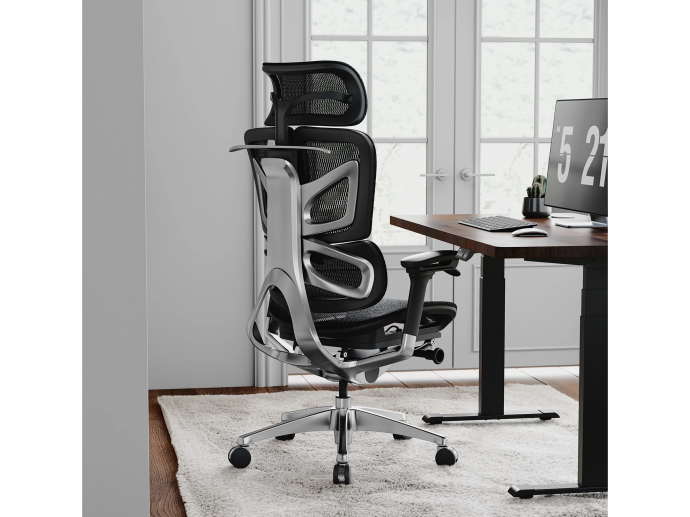
09/28/2026For many US workers, remote and hybrid schedules mean spending eight to ten hours a day at a desk. Chair choice should go beyond appearance or initial softness and focus on support, adjustability, fit, and comfort. A well-designed ergonomic office chair should support different working positions without making the body feel fixed in one posture.
What to Look for in an Ergonomic Office Chair
A chair for long workdays needs to stay supportive after several hours, so fit and movement matter more than extra padding. When comparing an ergonomic office chair, focus on adjustments that match your body and the way you actually work.
Support and Lumbar Fit
A soft cushion may feel comfortable at first, but it does not automatically provide better long-term support. Look for balanced support around the lower back, hips, and thighs, while lumbar support should meet your back naturally rather than force an exaggerated curve.
Adjustable lumbar support can suit different body types and sitting habits. The goal is to keep the lower back supported while still allowing small posture changes throughout the day.
Seat Height and Depth
Your feet should rest securely on the floor, while the seat supports your thighs without pressing behind the knees. Adjustable seat height and depth are especially useful because users vary in height, leg length, and body proportions.
Armrests and Recline
Armrests should support your forearms without pushing your shoulders upward, especially if you spend hours typing or using a mouse. A smooth recline also lets you shift between focused work, reading, calls, and short breaks while keeping your back supported.
Cushion and Breathability
Do not judge a seat only by how soft it feels during the first few minutes. Cushion firmness, seat shape, pressure distribution, and breathability can become much more noticeable after several hours.
Mesh may improve airflow in warmer rooms, while upholstered seats may suit users who prefer a softer surface. The better option depends on your office environment and personal preference.
What Makes an Office Chair Comfortable for Long Hours?
Long-term comfort comes from several features working together rather than one standout feature. A chair should continue to feel supportive several hours into the day, not just during a quick test.
Look Beyond Cushion Softness
The most comfortable office chair is not necessarily the one with the softest seat. Comfort also depends on lumbar support, seat depth, armrest position, back support, and how easily the chair adjusts to your body.
A chair that feels plush at first may become uncomfortable if the seat is too deep, the lumbar support sits in the wrong place, or the armrests cannot be positioned correctly.
Match the Chair to Your Work Style
Your work habits should help determine which features matter most. If you spend most of the day typing or using a mouse, prioritize armrests, seat height, and lumbar support. If your schedule includes frequent meetings or reading, backrest movement and recline may be more useful.
For a warm home office, breathable materials may deserve more attention. Users who sit for long periods may also benefit from a chair that makes small posture changes easy.
How to Set Up Your Chair for an 8–10 Hour Day
Buying the right chair is only the first step because even a highly adjustable chair can feel uncomfortable when set incorrectly. Start with the basic adjustments, then fine-tune them based on how your body feels during actual work.
Adjust Seat Height, Lumbar Support, and Armrests
Set the seat so your feet rest comfortably on the floor and your legs remain relaxed. Position lumbar support where it naturally meets your lower back, then adjust the armrests so your shoulders can stay relaxed while typing.
Avoid setting the seat too high or placing the armrests where they push your shoulders upward. Small adjustments are often more useful than trying to force your body into a rigid “ideal” posture.
Change Positions Throughout the Day
Do not try to hold one posture for eight to ten hours. Recline occasionally, stand up, walk around, and change sitting positions so the chair supports movement rather than restricting it.
A good office chair should make these changes easy while still providing stable support when you need it.
Consider Your Daily Work Routine
The way you use your chair throughout the day should influence which features you prioritize. If you regularly switch between typing, video calls, reading, and other tasks, look for a chair that allows you to adjust your position without difficulty. A flexible backrest and smooth recline can make transitions between different activities more comfortable.
If you spend long periods working at a desk, seat cushioning and lower-back support may become especially important. Consider how the chair feels after several hours rather than judging it only during a short sitting session. A chair that remains comfortable throughout the day can make it easier to maintain a productive routine.
Create a More Comfortable Desk Setup
Your office chair works best when it is properly matched with the rest of your workspace. Desk height, monitor position, keyboard placement, and chair adjustments all contribute to overall comfort. Even a well-designed chair may feel less effective if your desk setup forces you to reach too far or raise your shoulders while working.
Keep your monitor at a comfortable viewing level and position your keyboard and mouse so your arms can remain relaxed. Adjust your chair after setting up the rest of your workspace, and make small changes whenever something feels uncomfortable.
The goal is not to maintain one rigid position throughout the day. Instead, create a setup that allows you to work comfortably while making natural movements and position changes easy.
Conclusion
Choosing a chair for eight to ten hours of daily use is less about finding the softest seat or the longest feature list and more about getting the right fit. Focus on support, adjustability, breathability, and how well the chair matches your body and work habits.
The best choice is a chair that stays supportive throughout the day while still allowing you to move and change position comfortably.
Comments
