Categories more
- Adventures (62)
- Arts / Collectables (14)
- Automotive (77)
- Aviation (65)
- Bath, Body, & Health (123)
- Children (6)
- Cigars / Spirits (71)
- Cuisine (66)
- Design/Architecture (22)
- Electronics (63)
- Entertainment (36)
- Event Planning (115)
- Fashion (45)
- Finance (10)
- Gifts / Misc (6)
- Home Decor (118)
- Jewelry (41)
- Pets (3)
- Philanthropy (1)
- Real Estate (16)
- Services (44)
- Sports / Golf (14)
- Vacation / Travel (85)
- Watches / Pens (33)
- Wines / Vines (34)
- Yachting / Boating (67)


I Tested ToMusic AI Like A Busy Creator

Published
04/27/2026Most people searching for an AI Music Generator are probably not trying to become full-time producers overnight. They are trying to solve a very ordinary creative problem: they need music, they need it soon, and they do not want the track to sound disconnected from the project. That was the mindset behind my test. I wanted to see whether ToMusic AI could help someone move from a rough creative idea to an actual song direction without making the process feel overly technical.
The frustration is easy to understand. A video can be well edited and still feel flat if the music is wrong. A podcast intro can sound cheap if the track feels generic. A brand reel can lose emotional power if the background music does not match the message. Music does not just fill silence. It tells the viewer how to feel.
That is why I tested ToMusic AI less like a software reviewer and more like a working creator. I imagined a person trying to finish a project after dinner, a marketer building three campaign concepts before a meeting, or a songwriter who has lyrics but not a finished arrangement. The question was not “Is this platform impressive?” The question was “Does it reduce the creative distance between idea and usable audio?”
Why Busy Creators Need Faster Music Drafts
The modern creator workflow is messy. One person may be writing captions, editing video, choosing thumbnails, managing a posting calendar, and reporting performance. In that reality, music creation often becomes a bottleneck. Even when the creator has a strong idea, converting that idea into a track can require time, software, musical knowledge, or money.
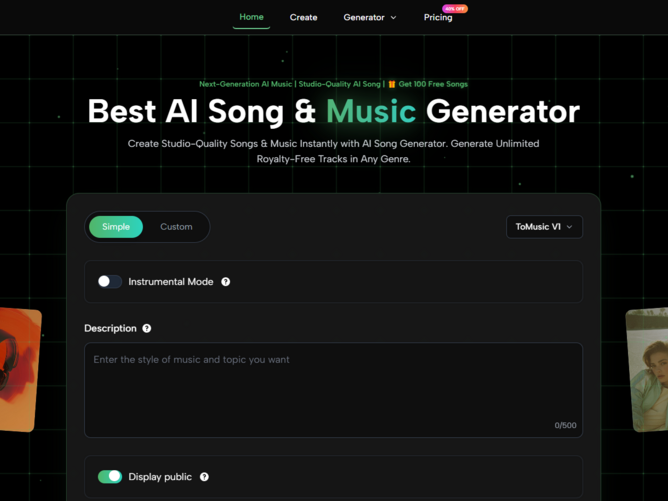
ToMusic AI is interesting because it starts from language. Instead of asking the user to open a complex production interface, the platform lets the user describe a musical goal. That design choice matters because most non-musicians think in scenes, moods, and references, not in chord progressions or mixing chains.
The Test Was About Usefulness, Not Hype
I did not evaluate the platform by expecting every generation to be final. That would be unfair and unrealistic. Even human creative work rarely works that way. Instead, I judged whether the system could produce drafts strong enough to guide the next decision.
A useful draft does not have to be perfect. It has to answer questions. Does this mood fit the video? Do these lyrics feel better with a vocal performance? Is the track too energetic, too slow, too polished, or too dramatic?
Why First Drafts Matter More Than Perfection
A first draft gives shape to a vague idea. Before hearing something, a creator may only have a feeling. After hearing a draft, the creator can respond: more warmth, less percussion, stronger chorus, softer vocal, faster tempo, or a more cinematic atmosphere.
That response loop is where ToMusic AI becomes useful. It gives the user something concrete to judge.
The Platform Rewards Clear Creative Thinking
One of the strongest lessons from testing ToMusic AI is that the platform rewards clarity. A short prompt can produce something, but a thoughtful prompt gives the system more creative direction. This is especially important for users searching in American-style practical language, such as “AI music for YouTube,” “make a song from lyrics,” or “generate music for a business video.”
Those searches usually imply a use case. ToMusic AI becomes more effective when the prompt also includes that use case.
A Better Prompt Sounds Like A Brief
The best prompts feel less like commands and more like small creative briefs. They describe the kind of track, the emotion, the audience, and the situation. That does not require expert music vocabulary. It simply requires context.
For example, instead of asking for “upbeat pop,” a user might ask for “an optimistic pop track for a small business launch video, with bright drums, warm vocals, and a confident chorus.” That gives the system more to work with.
Mood, Purpose, And Genre Work Together
Genre alone is not enough. A rock song for a sports intro and a rock song for a nostalgic road trip can be very different. Mood and purpose help narrow the direction.
In my testing mindset, I found that describing the intended scene made the creative request feel more grounded. A tool like this needs context because music is always connected to a moment.
Text-Based Creation Feels Natural For Non-Musicians
The most beginner-friendly part of the experience is that users can begin with words. This is where Text to Music feels meaningful as a workflow, because the user does not need to build the track manually. The platform interprets written direction and turns it into musical output.
For non-musicians, that lowers the emotional barrier. A person may not know how to compose a melody, but they usually know whether a track should feel calm, energetic, romantic, cinematic, playful, or serious.
The User Still Guides The Result
This is not passive creation. The user’s words matter. If the prompt is careless, the result may feel generic. If the prompt is specific, the result has a better chance of landing near the intended mood.
That balance feels important. ToMusic AI is easy to enter, but it still rewards thoughtful creative direction.
What I Noticed Across Practical Test Scenarios
To make the test feel realistic, I thought through several common creative situations. These are the kinds of projects where American users often search for AI music tools: YouTube videos, short-form social content, podcast intros, indie songs, educational material, small business promotions, and personal creative experiments.
In each case, the value depends on whether the platform can help the user hear an idea quickly.
Social Videos Need Immediate Emotional Fit
For short-form social content, the music has to communicate quickly. A viewer may decide within seconds whether a video feels worth watching. In that context, speed matters. ToMusic AI can help a creator test multiple moods before choosing the one that fits.
A travel clip may need dreamy electronic music. A fitness reel may need stronger percussion. A family montage may need something warmer and less polished. Prompting for the exact scene can help shape the direction.
Fast Platforms Still Need Tasteful Choices
The danger with quick music generation is using the first result simply because it exists. That is not a good creative habit. A better approach is to generate several options and choose the one that truly supports the video.
The platform makes this kind of comparison easier, but the user still has to make the final call.
Songwriters Can Start From Lyrics
ToMusic AI also becomes more interesting for people who already write lyrics. Its Lyrics to Music AI workflow supports custom lyrics and song structure tags, which means users can guide sections like verse, chorus, bridge, intro, and outro.
That matters because lyrics are not just text. They contain pacing, emotional build, repetition, and contrast. A chorus should usually feel different from a verse. A bridge should often feel like a shift. Custom structure gives the user a way to communicate those expectations.
Lyrics Testing Reveals Emotional Direction
Hearing lyrics performed can change how a writer understands them. A line that looked strong on the page may feel awkward in song. A chorus may need simplification. A verse may need more space.
In that sense, the platform can serve as a listening mirror. It helps the writer hear what the words might become.
A Plain Comparison For Real Users
This table summarizes how I would explain ToMusic AI after testing it through practical creative situations.
|
User Need |
Platform Fit |
What To Watch Carefully |
|
Quick background music |
Strong for fast mood testing |
Prompt must define scene and tone |
|
Lyrics into songs |
Useful with Custom Mode |
Structure labels improve direction |
|
Social video music |
Helpful for testing multiple moods |
First result may not be best |
|
Podcast or intro tracks |
Good for concept exploration |
Instrumental direction should be clear |
|
Small business promos |
Useful for affordable creative drafts |
Licensing details should be checked |
|
Educational songs |
Promising for simple memorable material |
Lyrics should be clear and structured |
|
Serious music production |
Better as a starting point |
Human editing may still be needed |
The Simple And Custom Modes Serve Different Users
One thing I appreciated is that ToMusic AI does not seem to force every user into the same creation style. Simple Mode and Custom Mode solve different problems. That distinction matters because music creation needs vary widely.
A casual creator may only want a fast track. A songwriter may want to shape lyrics. A marketer may need multiple moods. A video editor may care more about pacing than vocals.
Simple Mode Helps When Ideas Are Loose
Simple Mode is best when the user has a general direction but not a complete structure. It is useful for quick exploration, especially when the goal is to discover what kind of sound might fit a project.
This mode feels friendly because it does not demand too much upfront knowledge. The user can focus on mood, genre, and purpose.
Loose Ideas Still Need Specific Context
Even in Simple Mode, context improves the result. A prompt should include where the music will be used. “Background music for a calm morning routine vlog” gives the system more direction than “calm music.”
he more the prompt resembles a real creative need, the more useful the output is likely to be.
Custom Mode Helps When Ideas Are Defined
Custom Mode is better when the user already has lyrics or wants more control over structure. The ability to use song labels such as verse, chorus, and bridge gives the platform clearer instructions.
This is important for anyone trying to create a song rather than only a background track.
Structure Makes The Song Easier To Interpret
Without structure, lyrics can be interpreted too loosely. With structure, the system has a better sense of which parts should repeat, build, or shift.
That does not guarantee a perfect result, but it makes the request more understandable.
The Limitations Are Part Of The Real Experience
The most honest way to talk about ToMusic AI is to say that it is useful, but not effortless. It can generate music quickly, but the user still has to think carefully. Prompt quality matters. Some outputs may feel close but not final. Regeneration may be necessary. Lyrics may need rewriting after hearing them performed.
These limitations do not ruin the experience. They make it feel more like a real creative process.
Prompt Dependence Is The Main Tradeoff
Because the platform starts from text and lyrics, the quality of instruction has a large influence on the outcome. Users who are willing to revise prompts will likely get more value than users expecting instant perfection.
This is not unique to ToMusic AI. It is part of working with generative tools in general.
Revision Is A Creative Skill
A good revision might add emotion, remove ambiguity, specify vocal style, define tempo, or explain the project context. These changes can guide the next generation toward a better result.
The user becomes less like a passive consumer and more like a director.
Generated Music Still Needs Human Judgment
Even when the platform produces something strong, the user must decide whether it fits the actual project. Music can be technically decent and still emotionally wrong. A track can be catchy but distract from narration. A vocal can be interesting but not suitable for a brand video.
The tool helps create options. It does not eliminate taste.
The Best Users Will Compare Outputs
I would recommend generating at least a few versions before choosing one. Different prompts can reveal unexpected directions. Sometimes the second or third attempt may better match the project.
That comparison process is where the platform feels genuinely useful.
My Testing Verdict For American Creators
After testing the idea through realistic use cases, I see ToMusic AI as a practical music drafting tool for people who think in words before they think in production software. It fits creators who need speed, small teams that need affordable experimentation, and writers who want to hear lyrics become songs.
It should not be oversold as a perfect replacement for human production. But it also should not be dismissed as a novelty. Its value sits in the middle: fast enough to change the creative process, flexible enough to support different use cases, and simple enough for people who are not trained musicians.
Where The Platform Makes The Most Sense
The best use cases are early-stage creative decisions, social content, lyric testing, mood exploration, and project demos. In these situations, hearing a track quickly can unlock the next step.
That is the real benefit. The platform helps users stop imagining in silence.
Why I Would Keep Testing It
I would keep using ToMusic AI when I need to compare musical directions quickly. I would not expect every output to be final, but I would expect the process to help me think more clearly.
For many creators, that is already enough to make the tool worth serious attention.
Comments
