Categories more
- Adventures (177)
- Arts / Collectables (180)
- Automotive (179)
- Aviation (235)
- Bath, Body, & Health (415)
- Children (81)
- Cigars / Spirits (201)
- Cuisine (544)
- Design/Architecture (293)
- Electronics (173)
- Entertainment (131)
- Event Planning (262)
- Fashion (400)
- Finance (110)
- Gifts / Misc (104)
- Home Decor (422)
- Jewelry (261)
- Pets (58)
- Philanthropy (62)
- Real Estate (272)
- Services (174)
- Sports / Golf (162)
- Vacation / Travel (883)
- Watches / Pens (170)
- Wines / Vines (667)
- Yachting / Boating (229)



Subtitle Generator by Clideo: Making Videos More Accessible

Published
09/28/2026Video content has become an essential part of communication, education, entertainment, and online marketing. However, many viewers watch videos without sound or prefer reading along while listening. Adding subtitles can make video content easier to understand and accessible to a wider audience. The subtitle generator by Clideo offers a convenient way to create subtitles for videos without requiring advanced editing skills.
For content creators, businesses, students, and social media users, automatically generated subtitles can reduce the time and effort involved in manually typing every spoken word.
What Is the Subtitle Generator by Clideo?
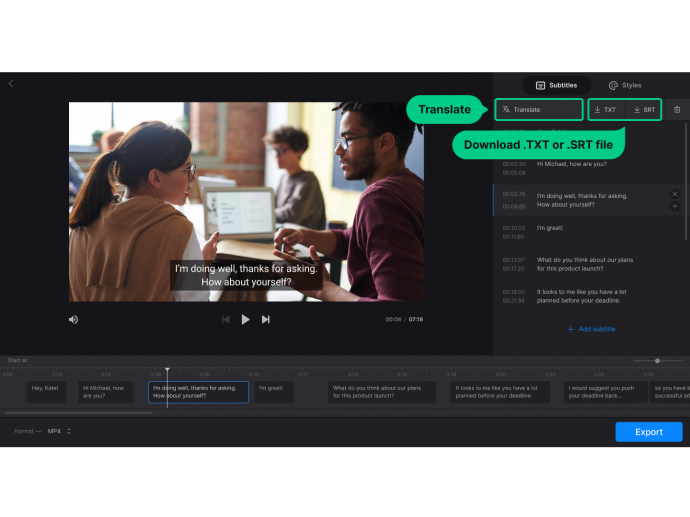
The subtitle generator by Clideo is an online tool designed to help users create subtitles for video content. Instead of manually writing a transcript and synchronizing every line with the video, users can use automated technology to generate subtitles from spoken audio.
Because the tool is browser-based, users can access it without necessarily installing complex video editing software. This can make the subtitle creation process more convenient for people who need to prepare videos quickly.
Why Are Subtitles Important?
Subtitles can improve the viewing experience in several situations. Many people watch videos in public places, offices, classrooms, or other environments where turning on sound may not be practical.
Subtitles also help viewers understand speech when the audio quality is not perfect. Accents, background noise, unfamiliar terminology, or fast dialogue can sometimes make spoken content difficult to follow. Having written text on the screen gives viewers another way to understand the message.
For businesses and creators, subtitles can also make videos more accessible to people who prefer or require text-based content.
Helpful for Social Media Videos
Social media platforms are highly focused on short-form and engaging video content. Many users scroll through their feeds without immediately enabling audio. Videos with subtitles can communicate their main message even when sound is turned off.
Using the subtitle generator by Clideo, creators can make their spoken content easier to follow without spending excessive time manually creating captions.
Once generated, subtitles can be reviewed and adjusted before the final video is published. This is particularly useful for promotional videos, educational clips, interviews, tutorials, and short social media content.
Saving Time During Video Production
Creating subtitles manually can be a time-consuming process. A creator may need to listen to the entire recording, type the dialogue, divide it into sections, and synchronize each line with the correct part of the video.
An automated subtitle tool can simplify these steps by generating text based on the video's audio. This allows creators to focus more attention on editing, storytelling, visuals, and other aspects of production.
Although automated transcription can save time, users should still review the generated subtitles before publishing. Names, technical terms, numbers, and unclear speech may occasionally require correction.
Useful for Educational Content
Teachers, students, trainers, and educational creators can also benefit from subtitles. Educational videos often contain detailed explanations that viewers may want to follow carefully.
Adding subtitles can make lectures, tutorials, and instructional videos easier to understand and review. Students can follow the spoken explanation while reading the text, while viewers who have difficulty hearing the audio can rely on the subtitles.
Subtitles can also be useful when educational content is shared with an international audience.
Supporting Wider Audiences
One of the biggest advantages of adding subtitles is the ability to reach people with different viewing preferences. Some viewers prefer reading while watching, while others may have difficulty hearing the original audio.
For creators trying to reach audiences across different platforms, subtitles can become an important part of their video workflow. They provide additional context and can help ensure that the main message is not lost when viewers watch without sound.
Tips for Accurate Subtitles
Good audio quality can make a significant difference when generating subtitles automatically. Whenever possible, record speech in a quiet environment and avoid unnecessary background noise.
After generating subtitles, carefully review the complete text. Check names, numbers, punctuation, technical terminology, and sentence breaks. It is also important to make sure subtitles appear at the appropriate times and remain readable on different screen sizes.
Avoid putting too many words on the screen at once. Short and clearly timed subtitle segments are generally easier for viewers to follow.
Conclusion
Subtitles can make videos more accessible, understandable, and suitable for different viewing environments. For creators who want to save time, automated subtitle generation can simplify a traditionally manual part of video editing.
The subtitle generator by Clideo provides an online approach to creating subtitles from video content, making it useful for social media creators, educators, businesses, and everyday users. By generating subtitles automatically and reviewing them carefully before publishing, users can produce clearer videos while making their content easier for a wider audience to follow.
Comments
